Beat Saber Beginner’s Guide: Modes, Scoring and How to Improve
How Beat Saber works: blocks, bombs and walls, how each cut is scored, difficulty levels, modifiers and practical tips for climbing from Normal to Expert.

Beat Saber looks simple from the outside: two glowing sabers, a stream of colored blocks, a song. Within a few minutes most new players discover that it is a surprisingly deep game, with a scoring system that rewards technique rather than flailing, and a difficulty curve that can take months to climb. This guide explains how the game works, how points are actually calculated, what the menus and modifiers do, and how to improve without wearing yourself out.
What Beat Saber Is and Where You Can Play It
Beat Saber is a VR rhythm game from Beat Games, the Czech studio originally known as Hyperbolic Magnetism. It launched in Steam early access on May 1, 2018, came to PlayStation VR in November 2018 and left early access on May 21, 2019. Facebook acquired Beat Games in November 2019, and the studio has since operated under Oculus Studios, now part of Meta.

Platform availability has shifted over the years, so it is worth being clear about the situation as of 2026:
- Meta Quest: the main home of the game, with ongoing updates and new music packs. Support for the original Quest 1 ended in November 2024, so current Quest headsets are the ones that receive new content.
- PC VR (Steam): continues to receive updates and music packs alongside Quest.
- PlayStation VR and PS VR2: Beat Games announced on June 18, 2025 that no new content would be released for PlayStation versions after that date, and online multiplayer on those platforms was scheduled to end on January 21, 2026. Owners can still play what they have.
If you are still deciding which headset to start with, our overview of standalone, PC and console VR explains the trade-offs, but for Beat Saber specifically, Quest or PC is now the route that keeps receiving new songs.
How a Level Plays: Blocks, Directions, Bombs and Walls
Every song is a “map”: a choreographed stream of objects flying toward you in time with the music. There are four things to understand.
Colored blocks
Blocks come in two colors, red and blue by default. The left saber is red and the right saber is blue, and you must hit each block with the matching saber. Hitting a block with the wrong color counts as a mistake.
Cut directions
Most blocks carry an arrow showing the direction you must swing through them: up, down, left, right or one of the four diagonals. Blocks with a dot instead of an arrow can be cut in any direction. Cutting an arrow block the wrong way is treated as a bad cut and breaks your combo.
Bombs
Dark spiked spheres are bombs. Touching one with a saber breaks your combo and costs energy. Mappers often use bombs to force your hands into a particular position, so treat them as part of the choreography rather than random obstacles.
Walls
Translucent walls require you to move your head and body, either leaning or stepping to the side, or ducking under a horizontal wall. Staying inside a wall drains energy. Walls are one reason the game is more physical than it first appears, and why a clear play space matters.
Underneath it all is the energy bar. Hits refill it, misses and mistakes drain it, and if it empties the song fails (unless you use the No Fail modifier, covered below).
How Scoring Works
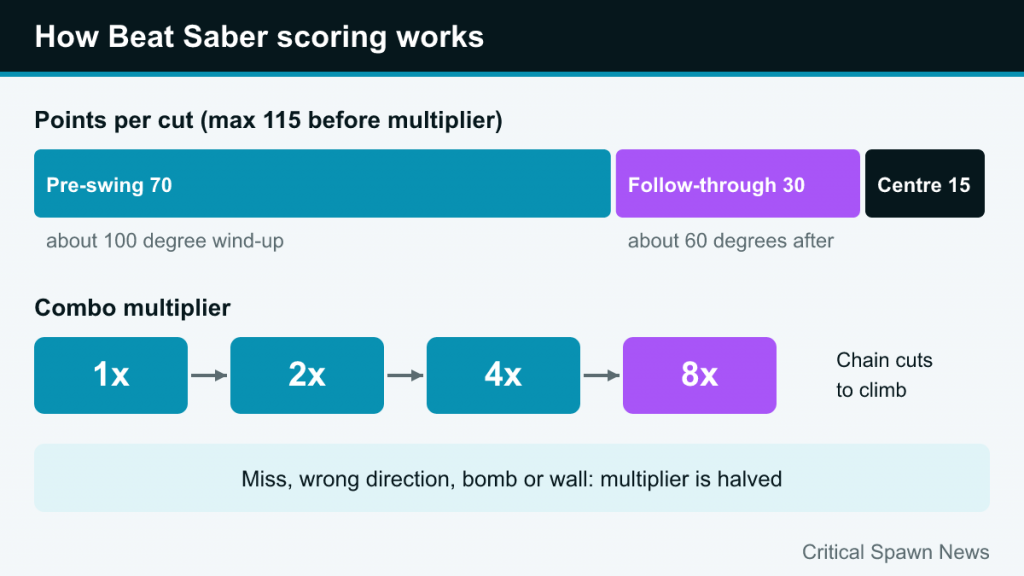
This is the part that separates people who enjoy Beat Saber casually from people who chase ranks. Each cut can earn up to 115 points before the combo multiplier, split into three parts:
| Component | What it measures | Max points |
|---|---|---|
| Pre-swing (approach) | How far your saber travels before hitting the block, with a full score for roughly a 100-degree wind-up | 70 |
| Follow-through (post-swing) | How far you continue the swing after the block, with a full score for roughly 60 degrees | 30 |
| Accuracy | How close to the center of the block you cut | 15 |
The practical lesson is that small, wristy flicks lose points. A good cut starts well before the block, passes through its center, and keeps going. Big swings are not the same as wild swings, though: the goal is a controlled arc, ideally driven by the forearm with some wrist, rather than full-shoulder chopping that tires you out.
The combo multiplier
Your score is multiplied by a combo multiplier that steps up from 1x to 2x, 4x and finally 8x as you chain successful cuts. Missing a block, cutting in the wrong direction or with the wrong saber, hitting a bomb or running into a wall halves the multiplier. This is why clean, consistent play beats a few perfect swings scattered among mistakes: staying at 8x for a long run is worth far more than chasing individual 115s.
Ranks
At the end of a song, your result is shown as a percentage of the maximum possible score along with a letter rank. Community references list SS for 90 percent and above, S from 80 percent, A from 65 percent, then B, C, D and E below that. A perfect 100 percent is practically impossible, so do not judge yourself against it.
Difficulty Levels and Game Modes
Most maps offer five difficulties: Easy, Normal, Hard, Expert and Expert+. The jump is not just speed. Higher difficulties add more blocks per second, more complex patterns (such as crossovers and fast alternating diagonals), more walls and less time to read what is coming. A song you can clear on Hard may be a completely different experience on Expert.
Beyond the standard two-saber mode, many maps include alternative characteristics:
- One Saber: only one saber and one color of block. Good for learning patterns and for players with limited use of one arm.
- No Arrows: every block can be cut in any direction, which makes the game more about rhythm and positioning than reading.
- 360 and 90 Degree: blocks arrive from around you rather than only in front, which requires turning your body. Useful for variety, but keep cable and room safety in mind if you play on PC with a tethered headset.
Campaign, Solo, Party and Multiplayer
The Campaign is a structured series of levels with specific goals, such as reaching a score, keeping a combo, or limiting how far your hands move. It is a good way to learn mechanics the free-play menu does not teach explicitly. Solo mode is the free-play song list. Party mode is designed for passing the headset around one device and keeps a local leaderboard, which is handy at gatherings.
Online Multiplayer arrived on PC and Quest in October 2020, with rooms for up to five players, through quick-play matchmaking or private lobbies with friends. Everyone plays the same map at the same time and sees each other’s scores in real time.
Modifiers: Making Songs Easier or Harder
Modifiers change how a song behaves and also affect the score multiplier. Some reduce your final score, others increase it. The most useful for beginners and improving players are:
- No Fail: the song continues even if your energy runs out. Excellent for practicing a song that is a little too hard, though your result is marked accordingly.
- Slower Song: plays the map at reduced speed, which is ideal for learning fast sections.
- Faster Song and Super Fast Song: speed everything up.
- No Bombs, No Walls, No Arrows: remove specific challenges. No Walls is also helpful for players who need to stay more stationary.
- Disappearing Arrows and Ghost Notes: hide information as blocks approach, forcing you to read further ahead.
- One Life and Four Lives: fail the song after one or four mistakes. Good for building discipline.
Treat modifiers as training tools. A common approach is to learn a hard map on Slower Song with No Fail, then remove the modifiers one at a time.
Music Packs and Custom Content
The base game ships with an original soundtrack, and Beat Games has added official music packs over the years, including packs built around artists such as Imagine Dragons, BTS, Linkin Park, Lady Gaga, Queen and Metallica, whose 17-song pack arrived in December 2024. Packs are sold as paid DLC, and the store also offers individual songs. Some songs are free additions, such as “Crab Rave,” which was added on April 1, 2019.
The game also includes a built-in level editor, added in May 2019. On PC, a large community scene around custom maps and mods has existed since the early access days. Be aware that mods are unofficial, can break after game updates, and are not supported by the developer; if you try them, follow the community’s own documentation and keep your expectations realistic after each patch.
How to Improve: Practical Tips
Most players plateau on Hard or early Expert. The habits below address the most common reasons why.
- Relax your grip. Squeezing the controllers tires your forearms and makes swings jerky. Hold them firmly enough to be safe, with wrist straps on, but loosely.
- Swing through, not at. Remember that 100 of the 115 points come from the swing itself. Think of each block as something on the path of a motion, not a target you poke.
- Return to a neutral position. After a downswing, your saber should be ready for the next likely upswing. Good maps follow a natural “flow” of alternating directions, and reading that flow reduces wasted movement.
- Look ahead, not at your sabers. Your eyes should be on the blocks arriving next. Peripheral vision handles the cut.
- Use practice mode. You can start a song from a specific point and slow it down, which is far more efficient than replaying a full track to reach one difficult section.
- Move your feet for walls. Leaning only from the waist strains your back. Small steps keep you balanced and centered.
- Climb gradually. Pick a handful of songs you enjoy and master them on one difficulty before moving up. Familiar music helps you anticipate patterns.
Common beginner mistakes
- Standing too close to the edge of the play area, which leads to hitting walls, shelves or ceilings. Check your boundary before each session.
- Playing only on the hardest difficulty you can barely pass. Failing repeatedly teaches survival, not technique.
- Ignoring the saber offset settings. If cuts feel slightly off, the controller settings let you adjust the saber position and angle relative to your hands.
Comfort, Safety and Session Length
Because the track moves toward you rather than you moving through the world, Beat Saber is one of the more comfortable VR games for people prone to motion sickness. That is part of why it appears so often on lists like our best VR games for beginners. The physical side is the bigger consideration: fast maps raise your heart rate, and sweat builds up in the face interface.
A few sensible habits go a long way. Clear the room and confirm the boundary covers your full arm reach in all directions. Use wrist straps. Keep sessions short at first and take breaks between songs. A wipeable face cover is worth considering if you play often. If you treat Beat Saber as exercise, warm up, drink water, and build intensity gradually; if you have any health concerns, consult a professional first.
Progress in Beat Saber is rarely linear. Some weeks a difficulty suddenly “clicks,” others feel stuck. Consistency matters more than marathon sessions, and the best players tend to be the ones who keep playing songs they love.