Local Co-op, Online Co-op and Split-Screen: Multiplayer Terms Explained
A plain-English glossary of co-op terms like split-screen, drop-in, asymmetric co-op and crossplay, plus how to read multiplayer labels on store pages.
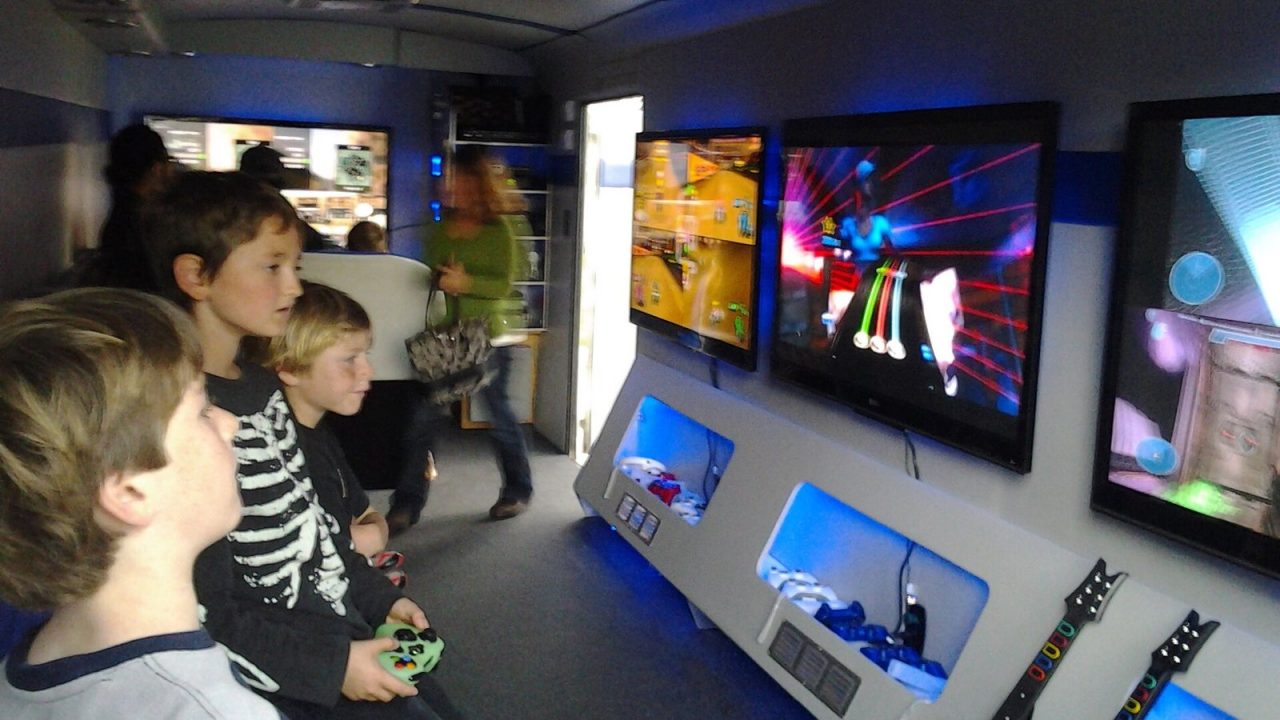
“Co-op” on a store page can mean very different things. One game lets four people play together on one sofa; another needs four consoles, four copies and four online subscriptions. Both may be described with the same word on a box or a banner, and the difference usually only becomes clear after you have paid.
This explainer works as a glossary of the multiplayer terms you will meet most often, followed by a guide to how the major storefronts label these features. Once you know what to look for, you can tell in under a minute whether a game supports the way you actually want to play.
The core distinction: where are the players?
Almost every multiplayer label answers one basic question: are the players in the same place, using the same device, or are they connected over a network?
Local co-op
Local co-op means two or more players cooperating on a single console or PC, in the same room, usually with one controller each. Only one copy of the game is needed, and guests do not need their own accounts on most platforms. It is the classic “couch co-op” setup; our guide to choosing couch co-op games covers how to pick titles for it.
Online co-op
Online co-op means each player uses their own device, connected over the internet. Typically each player needs their own copy of the game, and on consoles each player usually needs the platform’s online subscription. Some games make exceptions to the “own copy” rule, which are covered below.
LAN co-op
LAN co-op (local area network) is a middle ground: each player has their own machine, but the machines connect over the same home network rather than the internet. It is mostly a PC feature today, though Nintendo Switch’s “local wireless” play, where several consoles in the same room connect directly to each other, works on a similar principle.
How the screen is shared
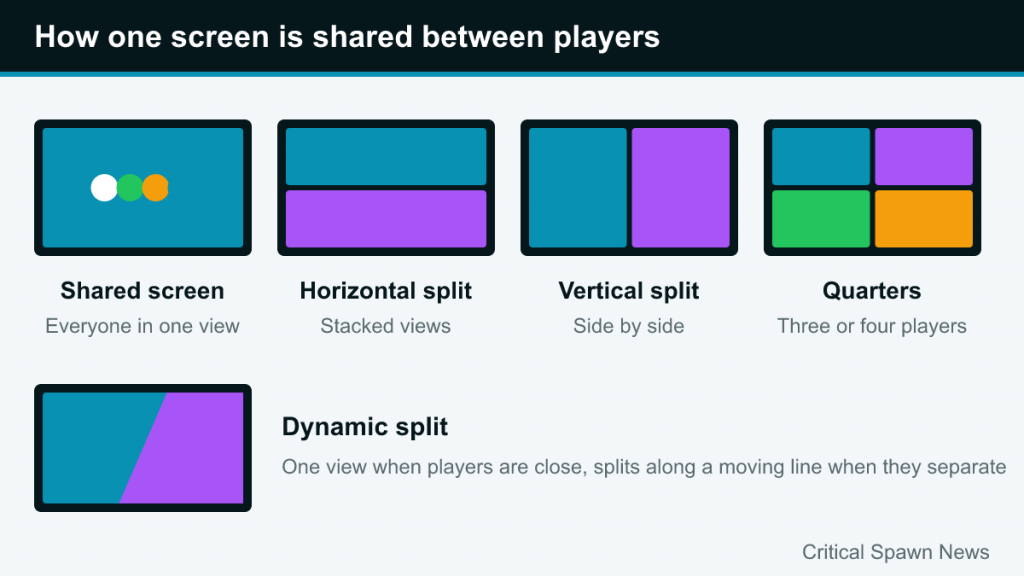
When players share one device, the game has to decide how to show everyone. There are three common approaches.
Shared screen
In a shared-screen game, all players appear in the same view. The camera either stays fixed on a single arena or zooms and pans to keep everyone visible. Puzzle, arena and chaos co-op games often use this approach. It keeps everyone aware of what teammates are doing but limits how far apart players can go.
Split-screen
In split-screen, the display is divided so each player has an independent view. With two players, the split can be horizontal (one view stacked above the other) or vertical (side by side). Vertical splits are common on modern widescreen TVs because each half keeps a taller, more natural shape; horizontal splits give each player a wide but short view. Some games let you choose. With three or four players, the screen is usually divided into quarters, with one quarter left empty or used for a map in three-player games.
Dynamic split-screen
Some games use a dynamic or adaptive split: players share one view while they are close together, and the screen splits along a moving line when they separate. It combines the shared view of a single screen with the freedom of split-screen.
Joining, leaving and dividing roles
Drop-in/drop-out
Drop-in/drop-out means a second (or third, or fourth) player can join a session in progress, usually by pressing a button on a connected controller, and can leave without ending the game. It is valuable for families and casual sessions where people come and go. Without it, players typically choose the number of participants at the start, and changing it means returning to a menu or restarting a level.
Symmetric co-op
In symmetric co-op, all players have the same abilities and goals. Most chaos co-op and arena games work this way: everyone can do every job.
Asymmetric co-op
In asymmetric co-op, players have different abilities, information or even different ways of playing. Examples range from two characters with different powers who must combine them to solve puzzles, to Keep Talking and Nobody Explodes, where one player sees the bomb and the others only have the defusal manual. Asymmetric design is especially useful for mixed-skill groups, since an experienced player can take the more demanding role.
Co-op campaign vs co-op mode
A co-op campaign means the main story can be played cooperatively from start to finish. A co-op mode may be a separate set of levels or challenges outside the story. Valve’s Portal 2, for example, has a separate cooperative campaign alongside its single-player story. Store pages sometimes blur these, so read the description carefully if playing the main story together matters to you.
Playing across platforms and distances
Crossplay
Crossplay (cross-platform play) lets players on different systems, such as PlayStation, Xbox, Switch and PC, play together online. It depends on the game and the publisher, and it is often switched on or off in a console’s settings or the game’s options menu. Many crossplay games require a publisher account (for example an EA, Epic or Ubisoft account) to link players across platforms.
Cross-progression and cross-save
Cross-progression or cross-save means your progress follows you between platforms. It is separate from crossplay: a game can let you play with friends on other systems without carrying your save across, and vice versa.
Cross-buy
Cross-buy means buying a game once grants access on more than one platform or console generation. It is about ownership, not multiplayer, but it often appears alongside multiplayer labels.
Friend passes and shared ownership
Some co-op games let a friend join online without buying the game. Hazelight’s It Takes Two uses a Friend’s Pass: according to its Steam page, a friend can join for free by installing the Friend’s Pass trial, as long as one player owns the game on the same platform family. These systems vary, so check the official rules for each game.
Remote Play Together and streaming
Steam’s Remote Play Together turns local multiplayer into online multiplayer. One player owns and runs the game, and Steam streams video and audio to friends, who send their controller input back. Valve describes it as supporting up to four players, or more with fast connections, and friends do not need their own copy. It only works with games that support local multiplayer and are enabled for the feature. Consoles also offer “remote play” features, but on PlayStation, Remote Play generally refers to streaming your own console to another of your devices rather than sharing a local co-op game with friends.
Reading the labels on each storefront
Each store presents multiplayer information differently. Here is what to look for on the main ones, based on how their pages are laid out as of 2026.
Steam
Steam pages have a features list on the right side. Common entries include Online Co-op, Online PvP, Shared/Split Screen Co-op, Shared/Split Screen PvP, LAN Co-op, Cross-Platform Multiplayer and Remote Play Together. These are set by the developer and are more reliable than the user-applied tags that appear under the screenshots, such as “Local Co-Op” or “Split Screen.” Note that “Shared/Split Screen” covers both shared-screen and split-screen games, so read the description or watch a trailer to see which applies.
Nintendo eShop
Nintendo’s store pages list a No. of players section broken down by mode. For example, the US listing for Overcooked! 2 shows “Single system (1-4)”, “Local wireless (2-4)” and “Online (2-4)”. “Single system” is local play on one Switch; “local wireless” means several consoles in the same room. The page also shows supported play modes (TV, tabletop, handheld), which matters because split-screen on a small handheld screen can be cramped.
Xbox Store
Xbox listings include a capabilities section with entries such as Xbox local co-op (2-4), Online co-op (2-4), Xbox local multiplayer, Online multiplayer and, where supported, Cross-platform multiplayer and Shared/split screen. The numbers in brackets give player ranges for each mode.
PlayStation Store
PlayStation Store pages typically list bullet points such as “Online play optional”, “PS Plus required for online play” and “Remote Play supported”, sometimes with the number of online players. Local player counts are not always as prominent, so check the game’s description or the publisher’s site if local play is your priority.
Quick reference table
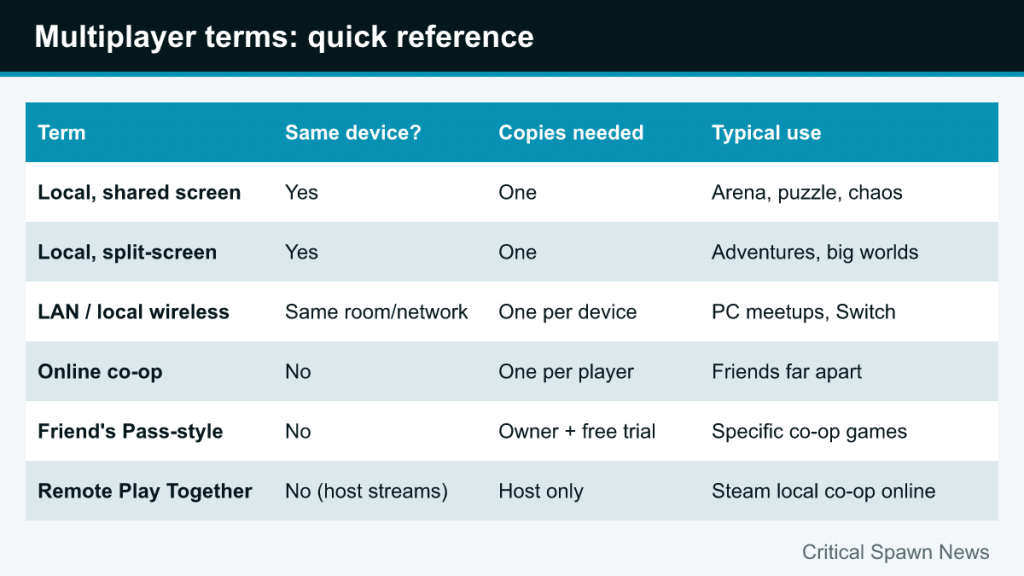
| Term | Same device? | Copies needed | Typical use |
|---|---|---|---|
| Local co-op (shared screen) | Yes | One | Arena, puzzle and chaos co-op |
| Local co-op (split-screen) | Yes | One | Adventures and larger worlds |
| LAN / local wireless | No, same room or network | Usually one per device | PC gatherings, multiple Switch consoles |
| Online co-op | No | Usually one per player | Friends in different homes |
| Friend’s Pass-style trial | No | One owner plus free trial | Specific co-op games |
| Remote Play Together | No (host streams) | Host only | Steam local co-op games played online |
Common misunderstandings
- “Multiplayer” does not mean local. A game advertised as multiplayer may be online-only. Look for explicit local, single-system or shared/split-screen labels.
- Player counts differ by mode. A game may support four players online but only two locally, or the reverse.
- Versions differ. PC, console and handheld versions of the same game sometimes have different local player limits.
- Crossplay is not automatic. Even when supported, it may be turned off by default, limited to certain platforms, or require a separate account.
- Online subscriptions. On consoles, online co-op generally requires each player’s platform subscription, while local co-op usually does not.
If you are planning a game night around one of these modes, our party night planning guide covers the practical side of controllers, seating and rotation.
A two-minute checklist before buying
- Decide how you want to play: same sofa, same room on separate devices, or different homes.
- Find the store’s official features or player-count section, not just user tags.
- Check the player range for that specific mode on your platform.
- For local play, check whether it is shared screen or split-screen and whether your screen is big enough.
- For online play, check crossplay support, account requirements and whether each friend needs a copy.
- Skim recent reviews or patch notes for changes, since multiplayer features are sometimes added or removed after launch.